Shift from Vibes to Production Code with the SOLO Protocol
Transform sloppy AI output into software that's actually production-worthy with Single Operator Loop Orchestration.

Mario Guerra
Author
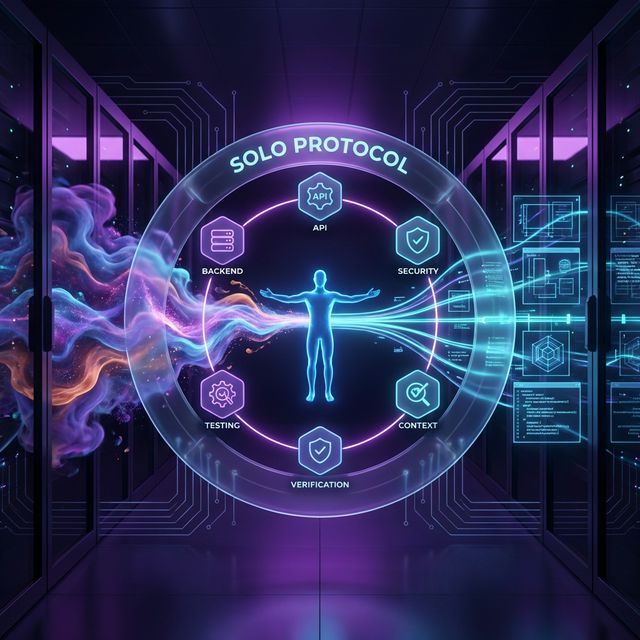
It's not about replacing AI autonomy with manual oversight, it's about adding just enough structure to transform sloppy AI output into software that's actually production-worthy.
Table of contents
- The problem with "just letting it code"
- The six pillars of SOLO
- The planning loop
- The execution loop
- The debug loop
- The memory loop
If you've spent any time building software with AI coding assistants, you've probably experienced the same frustration I have. You ask the AI to build something, and it happily obliges, taking the shortest possible path to a working solution. The code runs. It passes basic tests. But when you dig deeper, you find security gaps, brittle architecture, and business logic bleeding into the UI layer.
This is the reality of working with LLMs in 2026. They're brilliant, but they're also lazy.
After months of building production software as essentially a one-person engineering team, I developed a framework to address these challenges. I call it SOLO, which stands for Single Operator Loop Orchestration. It's not about replacing AI autonomy with manual oversight. It's about adding just enough structure to transform sloppy AI output into software that's actually production-worthy.
The problem with "just letting it code"
You've probably heard the buzz about agentic coding. The promise is simple: give an AI a goal, let it iterate until it succeeds, and come back to a finished product. In practice, this approach has some serious drawbacks.
- Token economics matter. Letting an AI loop endlessly until it figures things out burns through tokens at an alarming rate. Most of us don't have unlimited API budgets.
- LLMs skip the boring stuff. When I ask an AI to build something, it jumps straight to writing code. It doesn't think about architecture. It doesn't consider security. It doesn't plan for the full software development lifecycle.
- Context gets lost. As conversations grow, automatic compaction kicks in. The AI decides what to remember and what to forget, and its priorities rarely match mine.
- Band-Aid fixes compound. When something breaks, the AI's instinct is to apply quick patches. One fix leads to another, the code bloats, and suddenly I'm debugging a mess that nobody understands.
The six pillars of SOLO
I built SOLO on six principles that guide every interaction with the AI. None of these ideas are revolutionary on their own. The power comes from applying them consistently as a unified system.
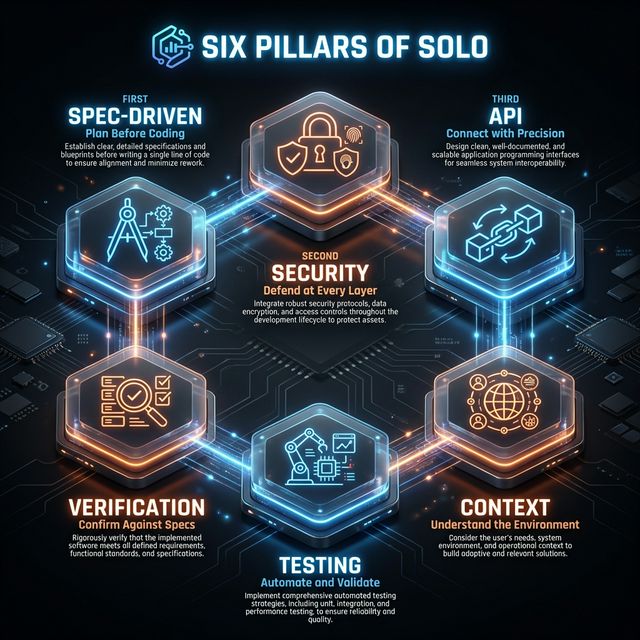
- 01: Spec-Driven development
I always lay down as much groundwork as possible before asking the AI to write code. Think of it like giving a builder a blueprint instead of just saying "build me a house." - 02: API-First design
I keep a clean separation between the backend plumbing and the frontend porcelain. I get the API contracts solid first, then worry about how things look. - 03: Security-First architecture
Authentication and security get designed before the first line of feature code. We've all heard the horror stories of vibe-coded apps getting their databases hacked. - 04: Trust but verify
I never accept the first output. LLMs will happily overwrite their own fixes when working on something new. I build in checkpoints where I review and approve before moving forward. - 05: Test-Driven development
I generate comprehensive tests for everything. I run all tests after every feature. Green and clean, no exceptions. - 06: Controlled context
I take ownership of what gets saved between sessions. I don't rely on automatic compaction to preserve what matters.
The planning loop
Before any code gets written, every feature runs through what I call the Planning Loop. This is a sequence of workflows initiated by "slash" (/) commands that force the AI through a rigorous planning process.
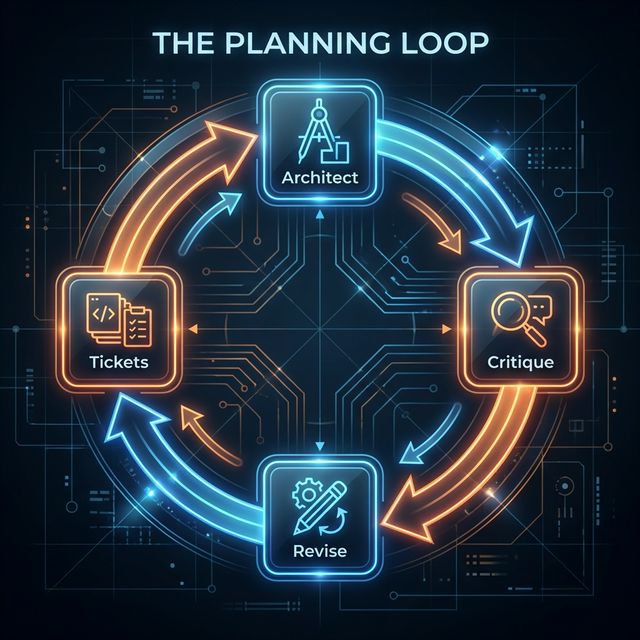
I start with the /Architect command. I'm asking the AI to act as a principal software architect, designing the system blueprint and API contracts based on my requirements.
I NEVER accept the first plan proposal and neither should you. The AI will find the laziest, quickest, shortest path to a solution. There are always problems lurking beneath the surface that will bite you later if you don't catch them upfront.
This is where the /Critique command comes in. I borrowed this idea from Google DeepMind's approach to self-improvement. I ask the AI to tear apart its own plan. What shortcuts did it take? What edge cases did it miss? What assumptions is it making that might not hold?
The critique surfaces issues that would otherwise bite me during implementation. Then I run the /Revise command to update the plan based on those findings. I might loop through critique and revise several times for complex features.
Only after I'm satisfied with the plan do I run the /Tickets command. This generates sprint tickets with clear dependencies, so the AI knows exactly what order to build things. I end up with a complete planning package before a single line of code gets written.
The execution loop
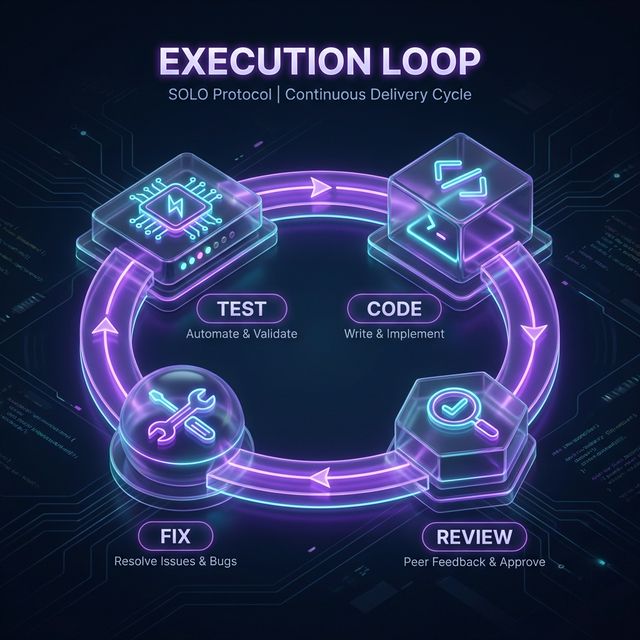
With solid planning artifacts in hand, I move into the Execution Loop. The /Code command invokes a principal software engineer persona with test-driven development baked in.
For refactoring existing code, I use a variant called /Code++. I actually stumbled on this by accident. I was working on a complex refactor, and the AI spontaneously decided to create a reference implementation first, then use that as a guide for modifying the existing code. The results were so much better that I formalized it into a workflow.
After coding comes the /Review command. This is an adversarial code audit, looking for brittle patterns, code smells, unstated assumptions, and potential failure points. The review generates a report, and then the /Fix command iterates through those issues.
Finally, the /Test command runs all frontend and backend tests. Everything must pass. No warnings. The AI keeps fixing until the test suite is green and clean. Importantly, the AI has strict instructions not to remove tests, hack tests, or otherwise work around failures to achieve this mandate. Proper code fixes are required. In cases where a test no longer matches the architecture, the test must be revised without compromising test quality.
The debug loop
Even with all this rigor, things still break sometimes. I deploy something, and it fails. That's inevitable. What matters is how I respond.

When a failure occurs and the cause isn't immediately obvious, I enter the Debug Loop. This starts with the /Sherlock directive, which I stumbled on out of frustration.
The AI kept applying Band-Aid after Band-Aid to a stubborn bug. The code was getting bloated with failed fixes. I finally said: "Stop. You are Sherlock Holmes, the world's greatest detective. This is a mystery that needs to be solved. Get to the bottom of it."
Something interesting happened. The AI shifted into a completely different mode. It started doing deep root cause analysis instead of surface-level patches. Models like Claude Opus really get into character. "Aha, the game is afoot, Watson!"
The persona shift breaks the AI out of its routine problem-solving patterns. It doesn't have to be Sherlock specifically, but finding a way to reframe the task as an investigation rather than a fix unlocks much better results.
Based on the Sherlock analysis, I often loop back to the Planning Loop. The root cause might reveal an architectural issue that needs the /Architect command to redesign. That plan gets run through /Critique and /Revise just like any new feature. Once I have a proper fix designed, I bump back up to the Execution Loop to implement it.
The Debug Loop isn't a linear path. It's an iterative cycle between investigation, planning, and execution until the issue is truly resolved.
The memory loop

One of the most important parts of SOLO is the Memory Loop, which handles context preservation across sessions.
When I rely on automatic compaction, I'm at the mercy of what the AI thinks is important. Things get lost. The AI forgets decisions that were made, analysis that was done, gotchas that were discovered. Compaction makes the model stupid because information just disappears.
The /Memory command is my custom compaction method. It creates a structured session file with exactly what I want preserved: project basics, current work in progress, discovered pitfalls, next steps, and an archive section that rotates older context. I invoke this at the end of each working session or after completing a significant feature.
When I start a new session, the /Resume command rehydrates that context. The AI reads the session memory file and picks up exactly where I left off. It knows what I've been working on, what problems I've encountered, and what's coming next.
The result is continuity across days and weeks of development. Projects can span multiple sessions without context loss. I'm not starting from scratch every time I open a new chat window.
This loop is what makes SOLO sustainable for real projects. Without it, I'd lose all the accumulated knowledge every time the context window fills up or I start a fresh session.
Who is this for?
You might be thinking this sounds like a lot of overhead. And you're right, it is more work than just asking an AI to build something. But here's the thing: the workflows encode expertise that you don't need to have yourself.
You don't need to be an expert architect to use the /Architect command. You don't need to be a security specialist to benefit from security-first design. The prompts are detailed and specific, steering the AI toward best practices that would otherwise require years of experience to know.
If you're building something just for yourself, maybe you don't need this level of rigor. But if you're putting code into production, if other people will use it, if it needs to be secure and maintainable, then the investment pays off.
The workflows are essentially a power-up. They add layers of abstraction on top of your interactions with the AI that improve the outputs. You can trust the results more because of the rigor built into the process.
Getting started
The SOLO Protocol is available as a collection of slash commands that work with Cursor, Antigravity, and any agentic IDE that supports slash commands. Drop the workflow files into the appropriate directory for your IDE, and the commands become available in your chat interface.
Start with a small project. Run through the Planning Loop once to get a feel for how the critique and revise cycle works. Pay attention to what the AI surfaces during critique that it didn't consider in the original plan.
Then try the Execution Loop. Notice how the review command catches issues that would have slipped through otherwise. See how the test command enforces discipline that's easy to skip when you're moving fast.
The goal isn't to follow every step rigidly. It's to internalize the principles and apply them where they matter most. Plan before you code. Critique your plans. Verify your implementations. Own your context.
The bigger picture
We're at an interesting moment in software development. AI tools are powerful enough to build real software, but not reliable enough to trust blindly. The developers who thrive will be the ones who figure out how to get the best from these tools while compensating for their weaknesses.
SOLO is my answer to that challenge. It's a framework for keeping a tight loop on AI while still leveraging its capabilities. It's not about fighting against AI autonomy. It's about channeling it productively.
The models will keep getting better. The workflows will evolve. But the core principles of planning first, verifying always, and owning your context will remain relevant for a long time.
If you try SOLO and find ways to improve it, I'd love to hear about it. This is a living framework, shaped by real-world use. The more people who contribute their experiences, the better it gets for everyone.
The SOLO protocol is open source and available on GitHub.